
What You’ll Learn
- Understanding how post dripping works
- Creating drip sessions for posts and pages
- Canceling active drip sessions
- Using Post Dripper with Boilerplate content
- Posts
- Pages
- Boilerplate Posts (only if the Boilerplate Extension is installed and activated)
- Boilerplate Pages (only if the Boilerplate Extension is installed and activated)
How it Works
Post Dripper Extension allows you to set how many selected sites receive the content at each interval. The Extension will post to all selected child sites. Once the Post/Page is published on all selected sites, the drip session ends. It will never publish the same content to one child site multiple times.Example 1
Publish this post to 1 site every 1 day (20 child sites selected)- Day 1: the article gets published on one selected child site
- Day 2: the article gets published on another selected child site
- Day 3: the article gets published on another selected child site
- …
- Day 20: the article gets published on the final selected child site
Example 2
Publish this post to 3 sites every 2 days (20 child sites selected)- Day 1: the article gets published on 3 selected child sites
- Day 2: nothing gets published
- Day 3: the article gets published on another 3 selected child sites
- Day 4: nothing gets published
- Day 5: the article gets published on another 3 selected child sites
- Day 6: nothing gets published
- …
- Day 13: the article gets published on the final 2 selected child sites
Example 3
Publish this post to 5 sites every 1 week (20 child sites selected)- Day 1: the article gets published on 5 selected child sites
- Day 2: nothing gets published
- Day 3: nothing gets published
- Day 4: nothing gets published
- Day 5: nothing gets published
- Day 6: nothing gets published
- Day 7: nothing gets published
- Day 8: the article gets published on another 5 selected child sites
- Day 9: nothing gets published
- Day 10: nothing gets published
- Day 11: nothing gets published
- Day 12: nothing gets published
- Day 13: nothing gets published
- Day 14: nothing gets published
- Day 15: the article gets published on another 5 selected child sites
- …
- Day 22: the article gets published on the final 5 selected child sites
Important Notes
Post Dripper runs through themainwp_post_dripper_cronposting scheduled event. If you rely on WordPress cron, keep MainWP Dashboard > Settings > Advanced Settings > Use WP Cron enabled and make sure your MainWP Dashboard site receives regular cron triggers.
Cancel a Drip Session
Cancel Post Drip Session
Log in to your MainWP Dashboard
Go to the MainWP Dashboard > Sites > Content Operations > Post Dripper page
Open the Post Drips tab
Locate the session that you want to cancel
Click the Cancel Drip action

Cancel Page Drip Session
Log in to your MainWP Dashboard
Go to the MainWP Dashboard > Sites > Content Operations > Post Dripper page
Open the Page Drips tab
Locate the session that you want to cancel
Click the Cancel Drip action
Create a Drip Session
Drip Posts
Log in to your MainWP Dashboard
Go to the MainWP Dashboard > Sites > Content Operations > Add New (Post) page
Set your post content and meta fields
Locate the Post Dripper section
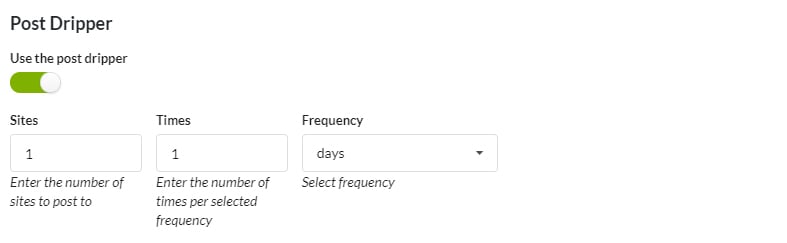
- Select the Use the post dripper option
- Set dripper preferences
Select your child sites
Click the Publish button
Drip Pages
Log in to your MainWP Dashboard
Go to the MainWP Dashboard > Sites > Content Operations > Add New (Page) page
Set your page content and meta fields
Locate the Post Dripper section
- Select the Use the post dripper option
- Set dripper preferences
Select your child sites
Click the Publish button
Drip Boilerplate Posts
Log in to your MainWP Dashboard
Go to the MainWP Dashboard > Sites > Content Operations > Manage Posts page
Click the Create New Boilerplate button
Set your boilerplate post content and meta fields
Locate the Post Dripper section
- Select the Use the post dripper option
- Set dripper preferences
Select your child sites
Click the Publish button
Drip Boilerplate Pages
Log in to your MainWP Dashboard
Go to the MainWP Dashboard > Sites > Content Operations > Manage Pages page
Click the Create New Boilerplate button
Set your boilerplate page content and meta fields
Locate the Post Dripper section
- Select the Use the post dripper option
- Set dripper preferences
Select your child sites
Click the Publish button
Related Resources
- Posts/Pages Add-ons - Browse all content tools
- Boilerplate Extension - Create reusable content
- Manage Posts - Post management guide